> ## Documentation Index
> Fetch the complete documentation index at: https://docs.lerian.studio/llms.txt
> Use this file to discover all available pages before exploring further.
# Exception details
> Open a reconciliation exception in the Matcher UI — inspect the available transaction data, review candidate matches, resolve or dispatch the exception, and view its comments and history.
The **Exception details** page in the Matcher UI brings together the exception record, its available transaction data, resolution controls, comments, and action history.
## Accessing exception details
***
On the [Exceptions](/en/matcher/ui/managing-exceptions) page, select the linked **Reason** in the exception row to open its detail page. You can also focus a queue row and press Enter. Both paths carry the queue's context scope when one is active.
 ## Page layout
***
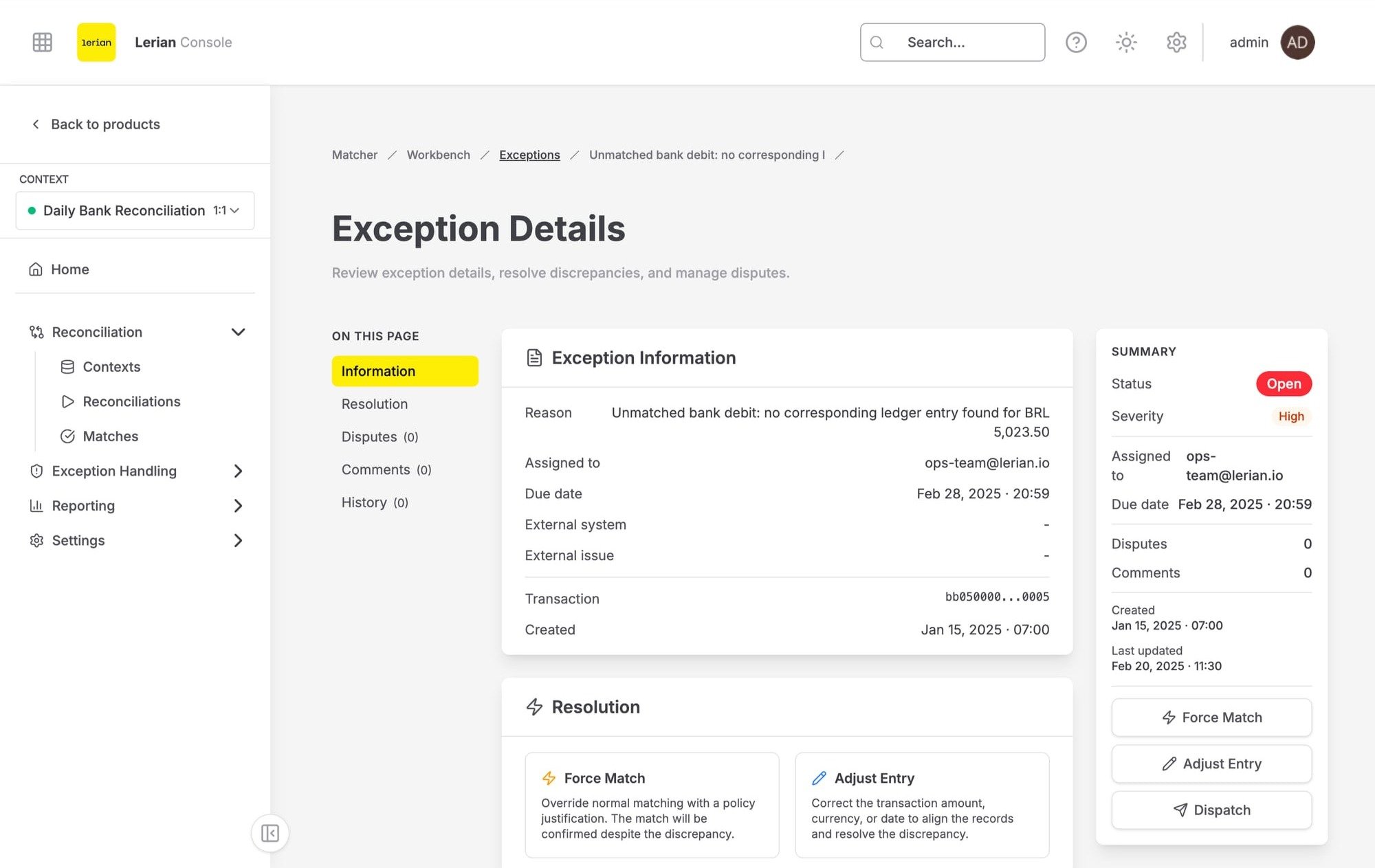
The page header always uses the title **Exception details**; it does not use the exception's reason or ID as its title. It includes a back button and, depending on your permissions, can show **View audit trail**, **Assign**, **Open dispute**, **Dispatch**, **Adjust entry**, **Resolve**, and **Force match**.
These controls are permission-gated, not selected by a configured workflow. For an exception in **RESOLVED** or **PENDING\_RESOLUTION**, the UI hides **Open dispute**, **Dispatch**, **Adjust entry**, **Resolve**, and **Force match**. **Assign** can still be shown to an operator with assignment permission, even in those states. The **Match to this** action belongs to the candidate panel rather than the header and requires manual-match permission. **View audit trail** appears only to an administrator or to a user with audit-log read permission; it opens a slide-over with the exception's immutable governance audit events.
Below the header, a status rail shows the exception ID, its severity and status badges, and the **Updated** timestamp.
The body is a three-column sheet: the **Transaction**, **Information**, **Candidate matches** or **Resolution**, and **Comments** panels fill the two left columns, while the **History** panel runs the full height of the right column.
### Queue navigation
The queue controls work only within the currently loaded page of the filtered Exceptions queue. When the exception is present in that session-scoped snapshot and the page has more than one item, **Previous exception** / **Next exception** buttons and a position indicator let you move among those siblings. They do not traverse to another cursor page; the boundary button is disabled.
The **Advance to next after resolving** checkbox appears only for a non-terminal exception that has a next sibling. After a successful **Resolve**, **Force match**, **Adjust entry**, or **Match to this** action, it opens that recorded next sibling when selected. At the last item, there is no next sibling and the checkbox is not shown. If the browser cannot persist the session snapshot, the page simply omits sibling navigation.
## Panels
***
### Transaction
The exception record itself supplies its transaction ID. With a resolved reconciliation context, the page enriches that ID from the unmatched report and shows **Amount**, **Currency**, **Transaction date**, and **Source**. It is not an arbitrary full transaction-payload viewer.
If the page has no context from the route or the current session, use the context selector in the panel header. If enrichment remains unavailable—for example, because the transaction is already matched or outside the report window—the panel still shows the transaction ID and explains why the fuller data is unavailable instead of showing a zero amount.
### Information
The **Information** panel displays read-only details about the exception:
| Field | Description |
| ------------------- | ---------------------------------------------------------------------------------- |
| **Reason** | The localized exception-reason code or free-text reason recorded for the exception |
| **Assigned to** | The person responsible for resolving the exception, if assigned |
| **Due date** | The resolution deadline, if set |
| **External system** | Reference to the external target, if dispatched |
| **External issue** | External issue identifier, if available |
| **Transaction** | The related transaction ID (copyable) |
| **Originating run** | The most recent match run that surfaced the exception (copyable when present) |
| **Created** | When the exception was created |
| **Updated** | When the exception was last updated |
### Candidate matches
For an exception that is not **RESOLVED** or **PENDING\_RESOLUTION**, the **Candidate matches** panel requests counterpart candidates for the exception transaction in one reconciliation context. It requests up to 50 ranked proposals by default; the candidate endpoint accepts a limit from 1 through 200.
Each proposal has a required 0–100 score, displayed with **Strong**, **Plausible**, or **Weak** confidence bands. The panel also shows the candidate's amount, currency, identifier, rule type, and date; its amount and date deltas; and the score rationale for amount, currency, date, reference similarity, and any configured composite match fields. Candidates are 1:1 opposite-side counterparts ranked over raw amounts: fee normalization and FX-variance bands are not applied here.
The panel requires a context. If none is available, it asks you to select one; an empty result is distinct from an error, and a request failure shows **Retry**. If you have manual-match permission, **Match to this** opens **Match to this candidate?** for confirmation. Confirming links the two transactions into a confirmed match group, removes them from the unmatched queue, and refreshes the exception.
### Resolution
For **RESOLVED** and **PENDING\_RESOLUTION** exceptions, a **Resolution** panel replaces the candidate panel. It can show the **Resolution type**, **Resolution reason**, **Resolution notes**, **Resolved by**, and **Resolved at** values recorded for the exception.
### Comments
The **Comments** panel shows each comment's author, relative timestamp, and content. Comments are returned oldest first. Enter text and click **Send**, or press Ctrl+Enter / Cmd+Enter. A comment must contain text and the service accepts up to 5,000 characters.
Only your own comments show a delete control. Deleting one requires confirmation and permanently removes it. Adding comments is disabled for exceptions in **RESOLVED** or **PENDING\_RESOLUTION**, but existing comments remain visible.
### History
The **History** panel shows an action timeline. Each entry contains the action description, the actor (or "system" for automated actions), and a relative timestamp. New entries are published asynchronously, so an action can take roughly two to three seconds to appear.
## Actions
***
The header contains the lifecycle actions; their visibility follows the permissions and status rules above. Manual matching is available from **Candidate matches**.
**Assign**
Opens the **Assign exception** dialog. The **Assignee** field starts with the current assignee when there is one; enter a nonempty assignee of up to 255 characters and click **Assign**.
**Open dispute**
Opens the **Open dispute** dialog. Select a **Category** — Bank Fee Error, Unrecognized Charge, Duplicate Transaction, Amount Mismatch, or Other — and provide a **Description**. The dialog requires both fields and limits the description to 2,000 characters. Then click **Open dispute**.
Evidence submission and dispute closure happen on the dispute's own detail page. See [Managing Disputes](/en/matcher/ui/managing-disputes).
**Dispatch**
Opens the **Dispatch to External System** dialog to send the exception to an external system for handling:
| Field | Description |
| ------------------- | ---------------------------------------------------------------------------------------------- |
| **Target system** | Required destination: JIRA, ServiceNow, Webhook, or Manual |
| **Queue / Project** | Optional queue or project identifier, up to 255 characters (for example, `OPS-RECONCILIATION`) |
If the selected target system does not have a connector configured, dispatch fails. Verify that the integration is set up in [Exception Routing](/en/matcher/configuration/matcher-exception-routing) before dispatching.
**Adjust entry**
Opens the **Adjust entry** dialog to record a monetary correction that resolves the exception. Every field is required; these fields are not conditional on a workflow configuration:
| Field | Description |
| ------------------ | --------------------------------------------------------------------------------------------------------- |
| **Reason code** | Amount correction, Currency correction, Date correction, or Other |
| **Amount** | A positive decimal amount; zero and negative amounts are rejected by the service |
| **Currency** | A three-letter currency code |
| **Effective date** | Required date; the dialog defaults it to the current UTC date |
| **Notes** | Required explanation. The dialog accepts up to 2,000 characters, while the service accepts at most 1,000. |
Click **Record adjustment** to submit the adjustment and resolve the exception.
**Resolve**
Opens the **Resolve exception** dialog to mark the exception resolved directly. **Resolution** is required and limited to 255 characters. Add an optional **Reason** of up to 1,000 characters for the record, then click **Resolve**.
**Force match**
Opens the **Force match** dialog to override normal matching and resolve the exception:
| Field | Description |
| ------------------- | --------------------------------------------------------------------------------------------------------- |
| **Override reason** | Policy Exception, Ops Approval, Customer Dispute, or Data Correction |
| **Justification** | Required explanation. The dialog accepts up to 2,000 characters, while the service accepts at most 1,000. |
Click **Confirm force match** to resolve the exception.
## Page layout
***
The page header always uses the title **Exception details**; it does not use the exception's reason or ID as its title. It includes a back button and, depending on your permissions, can show **View audit trail**, **Assign**, **Open dispute**, **Dispatch**, **Adjust entry**, **Resolve**, and **Force match**.
These controls are permission-gated, not selected by a configured workflow. For an exception in **RESOLVED** or **PENDING\_RESOLUTION**, the UI hides **Open dispute**, **Dispatch**, **Adjust entry**, **Resolve**, and **Force match**. **Assign** can still be shown to an operator with assignment permission, even in those states. The **Match to this** action belongs to the candidate panel rather than the header and requires manual-match permission. **View audit trail** appears only to an administrator or to a user with audit-log read permission; it opens a slide-over with the exception's immutable governance audit events.
Below the header, a status rail shows the exception ID, its severity and status badges, and the **Updated** timestamp.
The body is a three-column sheet: the **Transaction**, **Information**, **Candidate matches** or **Resolution**, and **Comments** panels fill the two left columns, while the **History** panel runs the full height of the right column.
### Queue navigation
The queue controls work only within the currently loaded page of the filtered Exceptions queue. When the exception is present in that session-scoped snapshot and the page has more than one item, **Previous exception** / **Next exception** buttons and a position indicator let you move among those siblings. They do not traverse to another cursor page; the boundary button is disabled.
The **Advance to next after resolving** checkbox appears only for a non-terminal exception that has a next sibling. After a successful **Resolve**, **Force match**, **Adjust entry**, or **Match to this** action, it opens that recorded next sibling when selected. At the last item, there is no next sibling and the checkbox is not shown. If the browser cannot persist the session snapshot, the page simply omits sibling navigation.
## Panels
***
### Transaction
The exception record itself supplies its transaction ID. With a resolved reconciliation context, the page enriches that ID from the unmatched report and shows **Amount**, **Currency**, **Transaction date**, and **Source**. It is not an arbitrary full transaction-payload viewer.
If the page has no context from the route or the current session, use the context selector in the panel header. If enrichment remains unavailable—for example, because the transaction is already matched or outside the report window—the panel still shows the transaction ID and explains why the fuller data is unavailable instead of showing a zero amount.
### Information
The **Information** panel displays read-only details about the exception:
| Field | Description |
| ------------------- | ---------------------------------------------------------------------------------- |
| **Reason** | The localized exception-reason code or free-text reason recorded for the exception |
| **Assigned to** | The person responsible for resolving the exception, if assigned |
| **Due date** | The resolution deadline, if set |
| **External system** | Reference to the external target, if dispatched |
| **External issue** | External issue identifier, if available |
| **Transaction** | The related transaction ID (copyable) |
| **Originating run** | The most recent match run that surfaced the exception (copyable when present) |
| **Created** | When the exception was created |
| **Updated** | When the exception was last updated |
### Candidate matches
For an exception that is not **RESOLVED** or **PENDING\_RESOLUTION**, the **Candidate matches** panel requests counterpart candidates for the exception transaction in one reconciliation context. It requests up to 50 ranked proposals by default; the candidate endpoint accepts a limit from 1 through 200.
Each proposal has a required 0–100 score, displayed with **Strong**, **Plausible**, or **Weak** confidence bands. The panel also shows the candidate's amount, currency, identifier, rule type, and date; its amount and date deltas; and the score rationale for amount, currency, date, reference similarity, and any configured composite match fields. Candidates are 1:1 opposite-side counterparts ranked over raw amounts: fee normalization and FX-variance bands are not applied here.
The panel requires a context. If none is available, it asks you to select one; an empty result is distinct from an error, and a request failure shows **Retry**. If you have manual-match permission, **Match to this** opens **Match to this candidate?** for confirmation. Confirming links the two transactions into a confirmed match group, removes them from the unmatched queue, and refreshes the exception.
### Resolution
For **RESOLVED** and **PENDING\_RESOLUTION** exceptions, a **Resolution** panel replaces the candidate panel. It can show the **Resolution type**, **Resolution reason**, **Resolution notes**, **Resolved by**, and **Resolved at** values recorded for the exception.
### Comments
The **Comments** panel shows each comment's author, relative timestamp, and content. Comments are returned oldest first. Enter text and click **Send**, or press Ctrl+Enter / Cmd+Enter. A comment must contain text and the service accepts up to 5,000 characters.
Only your own comments show a delete control. Deleting one requires confirmation and permanently removes it. Adding comments is disabled for exceptions in **RESOLVED** or **PENDING\_RESOLUTION**, but existing comments remain visible.
### History
The **History** panel shows an action timeline. Each entry contains the action description, the actor (or "system" for automated actions), and a relative timestamp. New entries are published asynchronously, so an action can take roughly two to three seconds to appear.
## Actions
***
The header contains the lifecycle actions; their visibility follows the permissions and status rules above. Manual matching is available from **Candidate matches**.
**Assign**
Opens the **Assign exception** dialog. The **Assignee** field starts with the current assignee when there is one; enter a nonempty assignee of up to 255 characters and click **Assign**.
**Open dispute**
Opens the **Open dispute** dialog. Select a **Category** — Bank Fee Error, Unrecognized Charge, Duplicate Transaction, Amount Mismatch, or Other — and provide a **Description**. The dialog requires both fields and limits the description to 2,000 characters. Then click **Open dispute**.
Evidence submission and dispute closure happen on the dispute's own detail page. See [Managing Disputes](/en/matcher/ui/managing-disputes).
**Dispatch**
Opens the **Dispatch to External System** dialog to send the exception to an external system for handling:
| Field | Description |
| ------------------- | ---------------------------------------------------------------------------------------------- |
| **Target system** | Required destination: JIRA, ServiceNow, Webhook, or Manual |
| **Queue / Project** | Optional queue or project identifier, up to 255 characters (for example, `OPS-RECONCILIATION`) |
If the selected target system does not have a connector configured, dispatch fails. Verify that the integration is set up in [Exception Routing](/en/matcher/configuration/matcher-exception-routing) before dispatching.
**Adjust entry**
Opens the **Adjust entry** dialog to record a monetary correction that resolves the exception. Every field is required; these fields are not conditional on a workflow configuration:
| Field | Description |
| ------------------ | --------------------------------------------------------------------------------------------------------- |
| **Reason code** | Amount correction, Currency correction, Date correction, or Other |
| **Amount** | A positive decimal amount; zero and negative amounts are rejected by the service |
| **Currency** | A three-letter currency code |
| **Effective date** | Required date; the dialog defaults it to the current UTC date |
| **Notes** | Required explanation. The dialog accepts up to 2,000 characters, while the service accepts at most 1,000. |
Click **Record adjustment** to submit the adjustment and resolve the exception.
**Resolve**
Opens the **Resolve exception** dialog to mark the exception resolved directly. **Resolution** is required and limited to 255 characters. Add an optional **Reason** of up to 1,000 characters for the record, then click **Resolve**.
**Force match**
Opens the **Force match** dialog to override normal matching and resolve the exception:
| Field | Description |
| ------------------- | --------------------------------------------------------------------------------------------------------- |
| **Override reason** | Policy Exception, Ops Approval, Customer Dispute, or Data Correction |
| **Justification** | Required explanation. The dialog accepts up to 2,000 characters, while the service accepts at most 1,000. |
Click **Confirm force match** to resolve the exception.