> ## Documentation Index
> Fetch the complete documentation index at: https://docs.lerian.studio/llms.txt
> Use this file to discover all available pages before exploring further.
# Audit logs
> Track instrumented reconciliation configuration and operational changes with a filterable, tamper-evident record for troubleshooting.
The **Audit Logs** page in the Matcher UI provides a filterable record of instrumented changes made to reconciliation configuration and operations. Use it to investigate the actor, action, and recorded time for those workflows.
## Accessing the Audit Logs page
***
Navigate to **Matcher → Reporting → Audit Logs** in the left sidebar.
You need an administrator role or audit-log read access to open this page.
## Verifying chain integrity
***
The **Tamper-evidence** panel sits above the filters. Click **Verify integrity** to re-verify the tenant audit hash chain. The check is read-only — it never alters a record — and returns one of two verdicts:
| Verdict | Meaning |
| ------------------------------------- | --------------------------------------------------------------------------------------------------------------------------------- |
| **Chain intact** | Every inspected record links to the previous one and matches its stored hash. The panel reports how many records were verified. |
| **Chain TAMPERED — integrity broken** | The hash chain is broken at a reported position. The audit log can no longer be trusted as tamper-evident — escalate immediately. |
If the chain is longer than the inspection bound, the intact verdict notes that only the first records from the chain start were inspected and the most recent entries were not checked. A failed request shows an error with a **Retry** button — it is not a verdict.
## Filters
***
Use the filter bar to narrow results. **Actor** is a free-text field of up to 255 characters. **Action** and **Entity type** are free-text fields of up to 50 characters each; none are dropdowns:
| Filter | Description |
| --------------- | --------------------------------------------------------------------------- |
| **Actor** | The raw actor identifier recorded with the change (for example, `user-123`) |
| **Action** | The operation performed (for example, `CREATE`, `UPDATE`, `DELETE`) |
| **Entity type** | The type of resource that was changed (for example, `context`) |
| **Date from** | Start date for the time range |
| **Date to** | End date for the time range |
Click **Apply filters** to run the search. Applying filters resets pagination to the first page.
## Audit log table
***
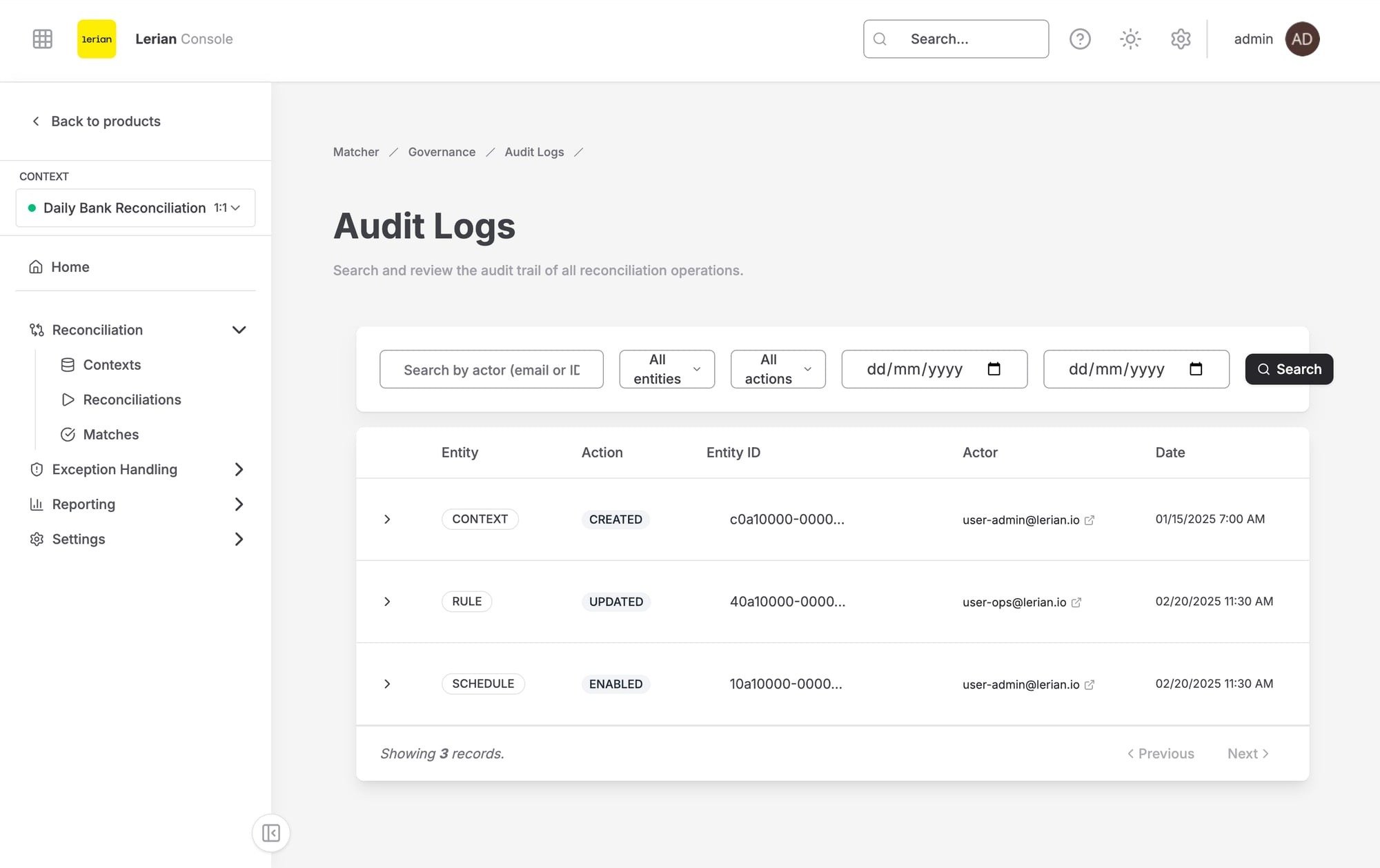 Each row in the table displays the following columns:
| Column | Description |
| --------------- | -------------------------------------------------------------------------------------------------------------------------------------- |
| **Entry** | The audit log record ID, shown as a link to a dedicated detail page for that entry — useful for pasting into an incident ticket |
| **Recorded** | When the change was recorded |
| **Action** | The operation performed |
| **Entity type** | The type of resource that was changed |
| **Entity ID** | Identifier of the affected resource |
| **Actor** | The raw actor identifier recorded with the change (for example, `user-123`), not a resolved person or system name |
| **Chain** | The record's chain position (`#`) and its record hash. Records written before the hash chain existed show **No chain proof** |
| **Changes** | A **View** button that opens the recorded JSON audit payload. Rows with no JSON changes show a placeholder |
Use the **Previous** and **Next** buttons in the table footer to page through results. The footer also shows the current page number and the number of events on that page.
## Viewing change details
***
Each row in the table displays the following columns:
| Column | Description |
| --------------- | -------------------------------------------------------------------------------------------------------------------------------------- |
| **Entry** | The audit log record ID, shown as a link to a dedicated detail page for that entry — useful for pasting into an incident ticket |
| **Recorded** | When the change was recorded |
| **Action** | The operation performed |
| **Entity type** | The type of resource that was changed |
| **Entity ID** | Identifier of the affected resource |
| **Actor** | The raw actor identifier recorded with the change (for example, `user-123`), not a resolved person or system name |
| **Chain** | The record's chain position (`#`) and its record hash. Records written before the hash chain existed show **No chain proof** |
| **Changes** | A **View** button that opens the recorded JSON audit payload. Rows with no JSON changes show a placeholder |
Use the **Previous** and **Next** buttons in the table footer to page through results. The footer also shows the current page number and the number of events on that page.
## Viewing change details
***
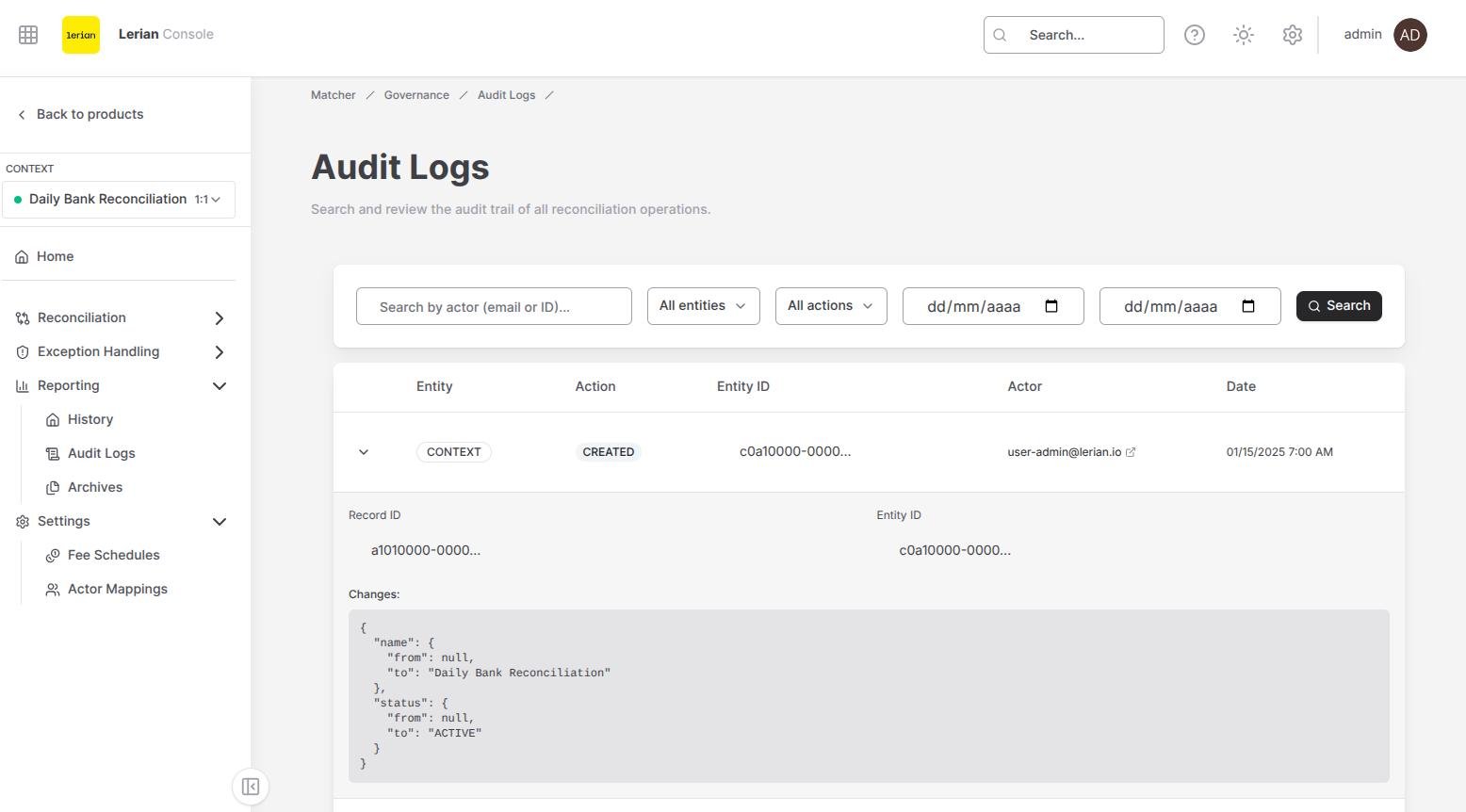 Click **View** in the Changes column to open the **Audit log changes** panel. The panel describes the recorded change (action, entity type, and entity ID), then shows the recorded JSON audit payload as a formatted block. Its fields depend on the operation; it does not guarantee a before-and-after schema.
You can also click the ID in the **Entry** column to open a dedicated detail page for that single entry.
If the original diff was larger than the audit payload cap, the row shows a **Diff truncated** marker and the panel explains that the full change set was replaced with a marker envelope. The complete diff is not recoverable from that record.
Click **View** in the Changes column to open the **Audit log changes** panel. The panel describes the recorded change (action, entity type, and entity ID), then shows the recorded JSON audit payload as a formatted block. Its fields depend on the operation; it does not guarantee a before-and-after schema.
You can also click the ID in the **Entry** column to open a dedicated detail page for that single entry.
If the original diff was larger than the audit payload cap, the row shows a **Diff truncated** marker and the panel explains that the full change set was replaced with a marker envelope. The complete diff is not recoverable from that record.