> ## Documentation Index
> Fetch the complete documentation index at: https://docs.lerian.studio/llms.txt
> Use this file to discover all available pages before exploring further.
# Managing contexts
> Create and manage reconciliation contexts in the Matcher UI — set cardinality, interval, fee tolerance, aging, auto-match, then wire up sources, field maps, rules, and schedules.
Use the **Contexts** page in the Matcher UI to create and manage reconciliation contexts. A context groups together the sources, field maps, rules, and schedules that define a specific reconciliation workflow.
## Accessing the Contexts page
***
To open the **Contexts** page, select **Contexts** under the **Configure** section of the left sidebar.
## Context list
***
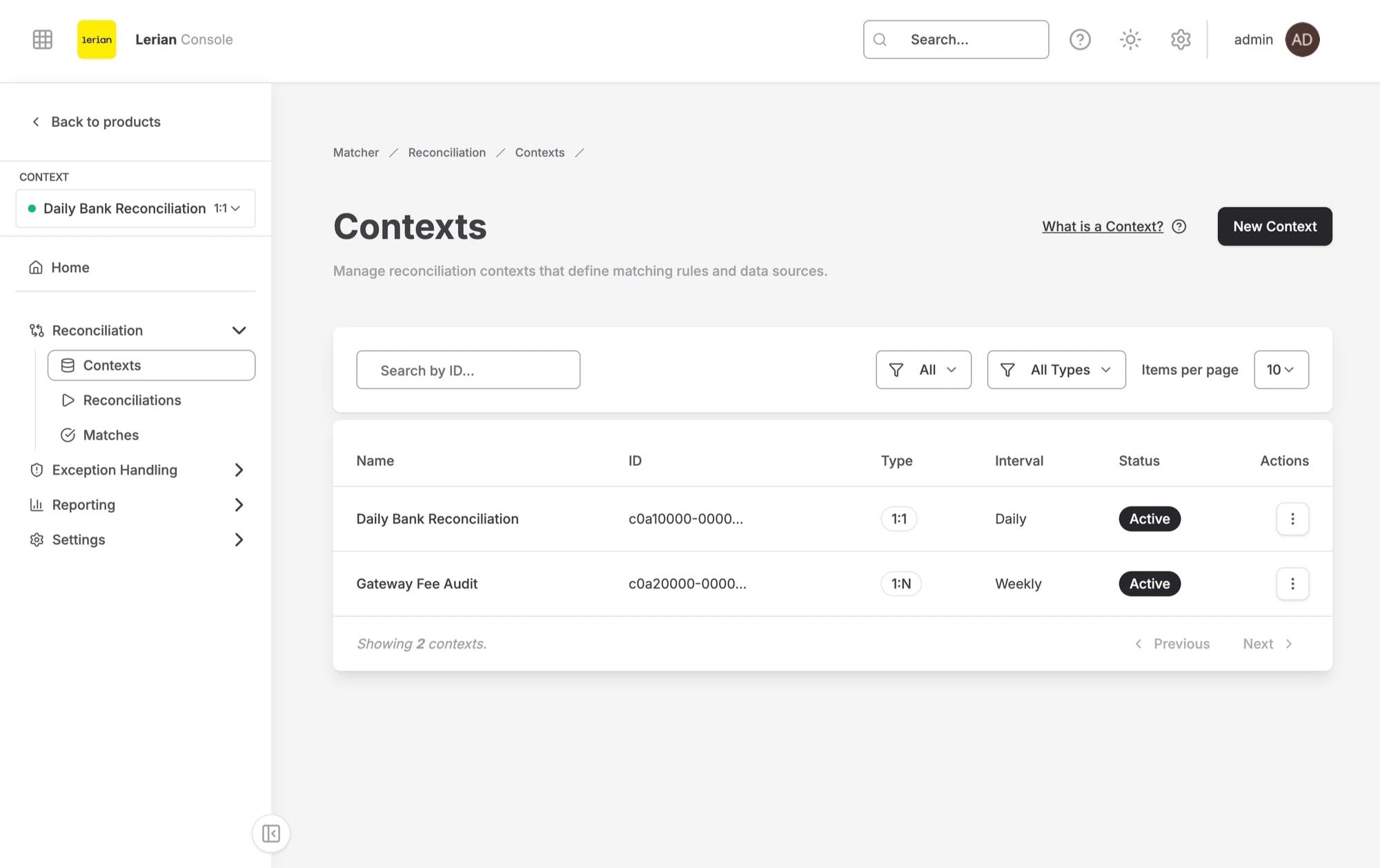 The table displays all reconciliation contexts with the following columns:
| Column | Description |
| ------------ | --------------------------------------------- |
| **Name** | The context name |
| **Type** | Matching cardinality (`1:1`, `1:N`, or `N:M`) |
| **Interval** | How often reconciliation runs |
| **Status** | Current state of the context |
| **Created** | When the context was created |
### Context statuses
| Status | Description |
| ------------ | ---------------------------------------------------------- |
| **Active** | The context is operational and accepts reconciliation runs |
| **Paused** | The context is temporarily suspended |
| **Draft** | The context is being configured and is not yet active |
| **Archived** | The context is no longer in use and has been archived |
Click a context name to open its detail page. Contexts are archived and restored rather than deleted — see [Context actions](#context-actions) below.
## Creating a new context
***
Click **New context** on the Contexts page to open the guided setup wizard. The wizard is the single path for creating a context; the first step collects the context configuration:
Fill in the general fields:
| Field | Description |
| ----------------------- | -------------------------------------------------------------------------------------------------------------------------------------------------------------------------------------------------------- |
| **Name** (required) | A descriptive name for the context (e.g., "Bank Reconciliation Q1") |
| **Type** (required) | Matching cardinality: `1:1` (one-to-one), `1:N` (one-to-many), or `N:M` (many-to-many) |
| **Interval** (required) | How often reconciliation runs. Choose the `Daily`, `Weekly`, or `Monthly` preset, or select `Custom` and type any cadence label (e.g., "every 4 hours"). The backend stores the interval as a free label |
Optionally configure **Fee normalization** — how fees are reconciled and the allowed variance:
| Field | Description |
| ----------------- | ----------------------------------------------------------------------- |
| **Mode** | Method used to normalize fee values before comparison: `NET` or `GROSS` |
| **Abs tolerance** | Maximum absolute difference allowed between matched amounts |
| **Pct tolerance** | Maximum percentage difference allowed between matched amounts |
Optionally configure **Open-item aging** to flag a carried open-item residual as aged once it stays open past a number of days:
| Field | Description |
| -------------------------- | --------------------------------------------------------------------------------------------------------- |
| **Aging threshold (days)** | Number of days after which an open item is flagged as aged. Leave empty to disable aging for this context |
| **Aging calendar** | How the age is measured: `Raw calendar days`, `US Federal`, or `Brazil ANBIMA` business days |
Optionally enable **Auto-match on upload**. When turned on, a match run is triggered automatically when a file is ingested into this context.
Click **Create context** in the wizard footer. The wizard then guides you through adding sources, field maps, and match rules.
## Context detail page
***
Click a context name in the list to open the context detail page. The detail page is organized into six tabs:
The table displays all reconciliation contexts with the following columns:
| Column | Description |
| ------------ | --------------------------------------------- |
| **Name** | The context name |
| **Type** | Matching cardinality (`1:1`, `1:N`, or `N:M`) |
| **Interval** | How often reconciliation runs |
| **Status** | Current state of the context |
| **Created** | When the context was created |
### Context statuses
| Status | Description |
| ------------ | ---------------------------------------------------------- |
| **Active** | The context is operational and accepts reconciliation runs |
| **Paused** | The context is temporarily suspended |
| **Draft** | The context is being configured and is not yet active |
| **Archived** | The context is no longer in use and has been archived |
Click a context name to open its detail page. Contexts are archived and restored rather than deleted — see [Context actions](#context-actions) below.
## Creating a new context
***
Click **New context** on the Contexts page to open the guided setup wizard. The wizard is the single path for creating a context; the first step collects the context configuration:
Fill in the general fields:
| Field | Description |
| ----------------------- | -------------------------------------------------------------------------------------------------------------------------------------------------------------------------------------------------------- |
| **Name** (required) | A descriptive name for the context (e.g., "Bank Reconciliation Q1") |
| **Type** (required) | Matching cardinality: `1:1` (one-to-one), `1:N` (one-to-many), or `N:M` (many-to-many) |
| **Interval** (required) | How often reconciliation runs. Choose the `Daily`, `Weekly`, or `Monthly` preset, or select `Custom` and type any cadence label (e.g., "every 4 hours"). The backend stores the interval as a free label |
Optionally configure **Fee normalization** — how fees are reconciled and the allowed variance:
| Field | Description |
| ----------------- | ----------------------------------------------------------------------- |
| **Mode** | Method used to normalize fee values before comparison: `NET` or `GROSS` |
| **Abs tolerance** | Maximum absolute difference allowed between matched amounts |
| **Pct tolerance** | Maximum percentage difference allowed between matched amounts |
Optionally configure **Open-item aging** to flag a carried open-item residual as aged once it stays open past a number of days:
| Field | Description |
| -------------------------- | --------------------------------------------------------------------------------------------------------- |
| **Aging threshold (days)** | Number of days after which an open item is flagged as aged. Leave empty to disable aging for this context |
| **Aging calendar** | How the age is measured: `Raw calendar days`, `US Federal`, or `Brazil ANBIMA` business days |
Optionally enable **Auto-match on upload**. When turned on, a match run is triggered automatically when a file is ingested into this context.
Click **Create context** in the wizard footer. The wizard then guides you through adding sources, field maps, and match rules.
## Context detail page
***
Click a context name in the list to open the context detail page. The detail page is organized into six tabs:
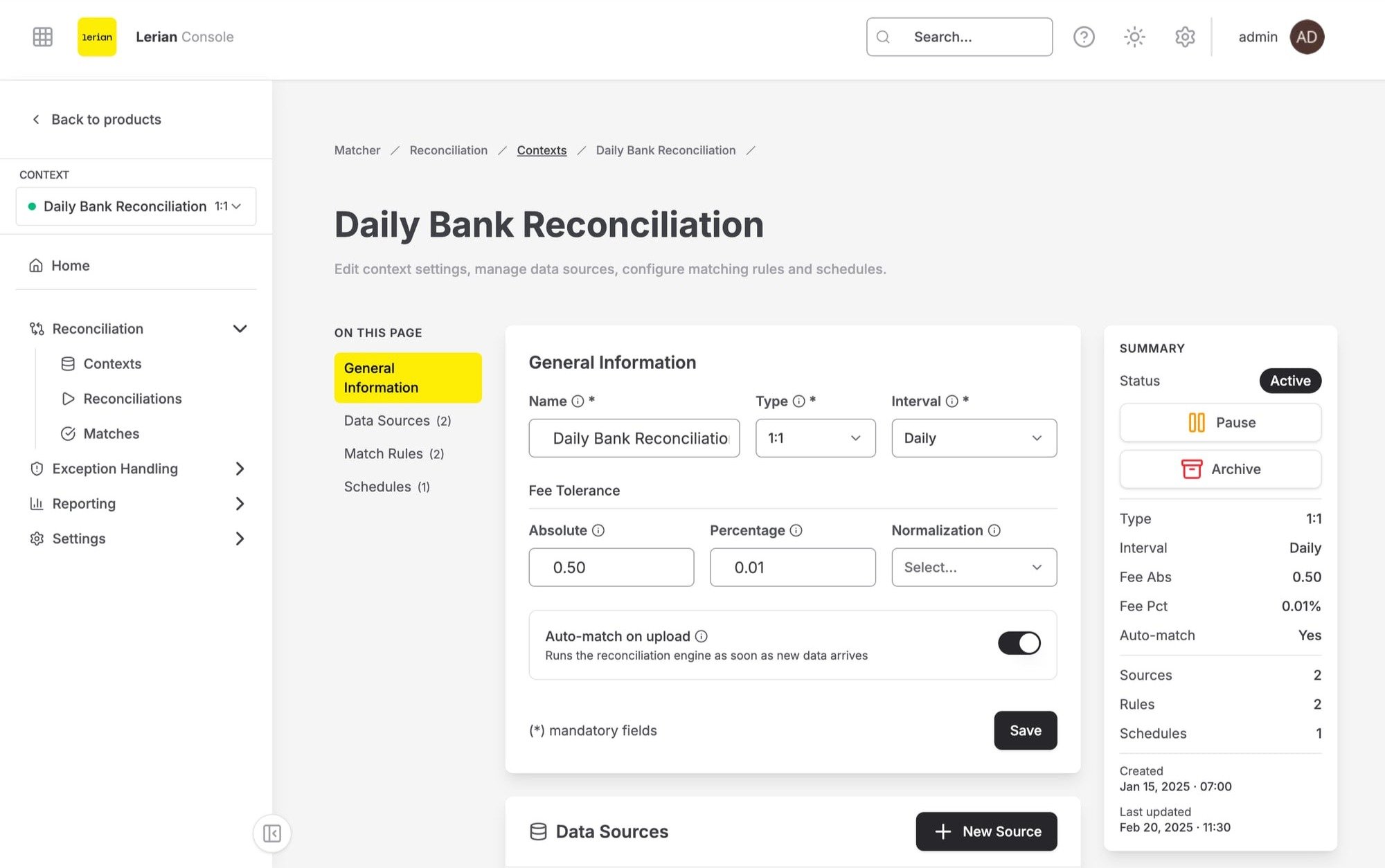 | Tab | Description |
| ----------------------- | ------------------------------------------------------------------------------------------------------------------------------- |
| **General information** | The context's current settings: name, type, interval, fee tolerance, aging, and auto-match configuration |
| **Sources** | Data sources configured for this context. See [Context sources](/en/matcher/ui/context-sources) |
| **Field maps** | Field mappings that bind each source's columns to the reconciliation fields |
| **Rules** | Match rules configured for this context. See [Context rules](/en/matcher/ui/context-rules) |
| **Fee rules** | Fee rules that bind fee schedules to this context's transactions |
| **Schedules** | Reconciliation schedules that define when runs execute automatically. See [Context schedules](/en/matcher/ui/context-schedules) |
### Context actions
The page header shows the context name, status badge, type, interval, and creation date, along with the following actions:
| Action | Description |
| ------------------- | ----------------------------------------------------------------------------------------------------------------------------------------------------------------------------------------------------------------------------------------- |
| **Edit context** | Opens a dialog to update the context name, interval, status (`ACTIVE`, `PAUSED`, or `ARCHIVED`), auto-match, fee normalization, and aging settings. Click **Save changes** to apply. To pause or resume a context, change its status here |
| **Clone context** | Creates a new context from this setup. You can choose whether to include sources and rules in the clone |
| **Archive context** | Retires the context. Archiving replaces deletion — the context and its history are preserved |
| **Restore context** | Brings an archived context back |
Sources, field maps, rules, fee rules, and schedules are all managed from within the context detail page. There are no separate standalone pages for these entities.
| Tab | Description |
| ----------------------- | ------------------------------------------------------------------------------------------------------------------------------- |
| **General information** | The context's current settings: name, type, interval, fee tolerance, aging, and auto-match configuration |
| **Sources** | Data sources configured for this context. See [Context sources](/en/matcher/ui/context-sources) |
| **Field maps** | Field mappings that bind each source's columns to the reconciliation fields |
| **Rules** | Match rules configured for this context. See [Context rules](/en/matcher/ui/context-rules) |
| **Fee rules** | Fee rules that bind fee schedules to this context's transactions |
| **Schedules** | Reconciliation schedules that define when runs execute automatically. See [Context schedules](/en/matcher/ui/context-schedules) |
### Context actions
The page header shows the context name, status badge, type, interval, and creation date, along with the following actions:
| Action | Description |
| ------------------- | ----------------------------------------------------------------------------------------------------------------------------------------------------------------------------------------------------------------------------------------- |
| **Edit context** | Opens a dialog to update the context name, interval, status (`ACTIVE`, `PAUSED`, or `ARCHIVED`), auto-match, fee normalization, and aging settings. Click **Save changes** to apply. To pause or resume a context, change its status here |
| **Clone context** | Creates a new context from this setup. You can choose whether to include sources and rules in the clone |
| **Archive context** | Retires the context. Archiving replaces deletion — the context and its history are preserved |
| **Restore context** | Brings an archived context back |
Sources, field maps, rules, fee rules, and schedules are all managed from within the context detail page. There are no separate standalone pages for these entities.