> ## Documentation Index
> Fetch the complete documentation index at: https://docs.lerian.studio/llms.txt
> Use this file to discover all available pages before exploring further.
# Managing Organizations
> Manage Organizations in the Midaz Module — create, edit, delete, and switch between the top-level entities that own your Ledgers and Accounts.
The Midaz module lets you manage your Organizations directly. You can create, edit, delete, and switch between them.
## Accessing the Organizations page
***
To open the **Organizations** page, click the **Organizations** option in the **Foundation** section of the left sidebar menu.
The **Organizations** page lists all your Organizations in one place.
### Available actions
From the **Organizations** page, you can:
## Multiple Organizations
***
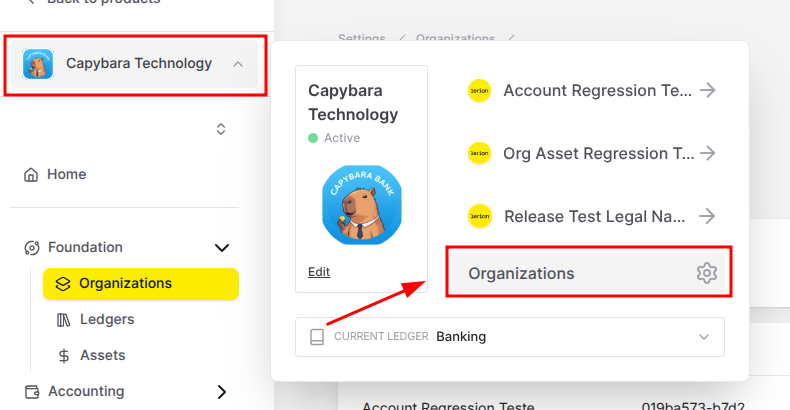
If you have more than one Organization, you can also open the **Organizations** page from the navigation bar. Click the Organization icon in the left navigation bar. Then select **Organizations** in the pop-up window (*Figure 1*).
 ### Changing Organizations
To work on a different Organization, use the same pop-up window. Select the cog icon ().
The **Organizations** page opens. Find the Organization you want. Click the three dots () in the **Action** column. Then select **Switch to this organization**.
### Changing Organizations
To work on a different Organization, use the same pop-up window. Select the cog icon ().
The **Organizations** page opens. Find the Organization you want. Click the three dots () in the **Action** column. Then select **Switch to this organization**.