Every transfer generates a complete audit trail. This page describes the data available for reporting, reconciliation, and compliance.Documentation Index
Fetch the complete documentation index at: https://docs.lerian.studio/llms.txt
Use this file to discover all available pages before exploring further.
What data is recorded per transfer
| Field | What it means |
|---|---|
transferId | Your internal reference for this transfer |
confirmationNumber | Human-readable reference (e.g. 20260205001) — show this to customers |
controlNumber | JD SPB reference — use for bank reconciliation |
type | TED OUT, TED IN, or P2P |
status | Current state of the transfer |
amount | Transfer amount before fee |
feeAmount | Fee charged |
totalAmount | Total debited (amount + fee) |
senderAccountId | Sending account in your system |
recipientAccountId | Recipient account in Midaz, when the recipient is represented internally |
recipientDetails | Recipient bank, branch, account number, and holder name |
originalTransferId | Original TED IN transfer when the record is a devolution |
devolutionCode | BACEN devolution reason code, when applicable |
createdAt | When the transfer was initiated |
completedAt | When settlement was confirmed |
Transfer status lifecycle
TED OUT
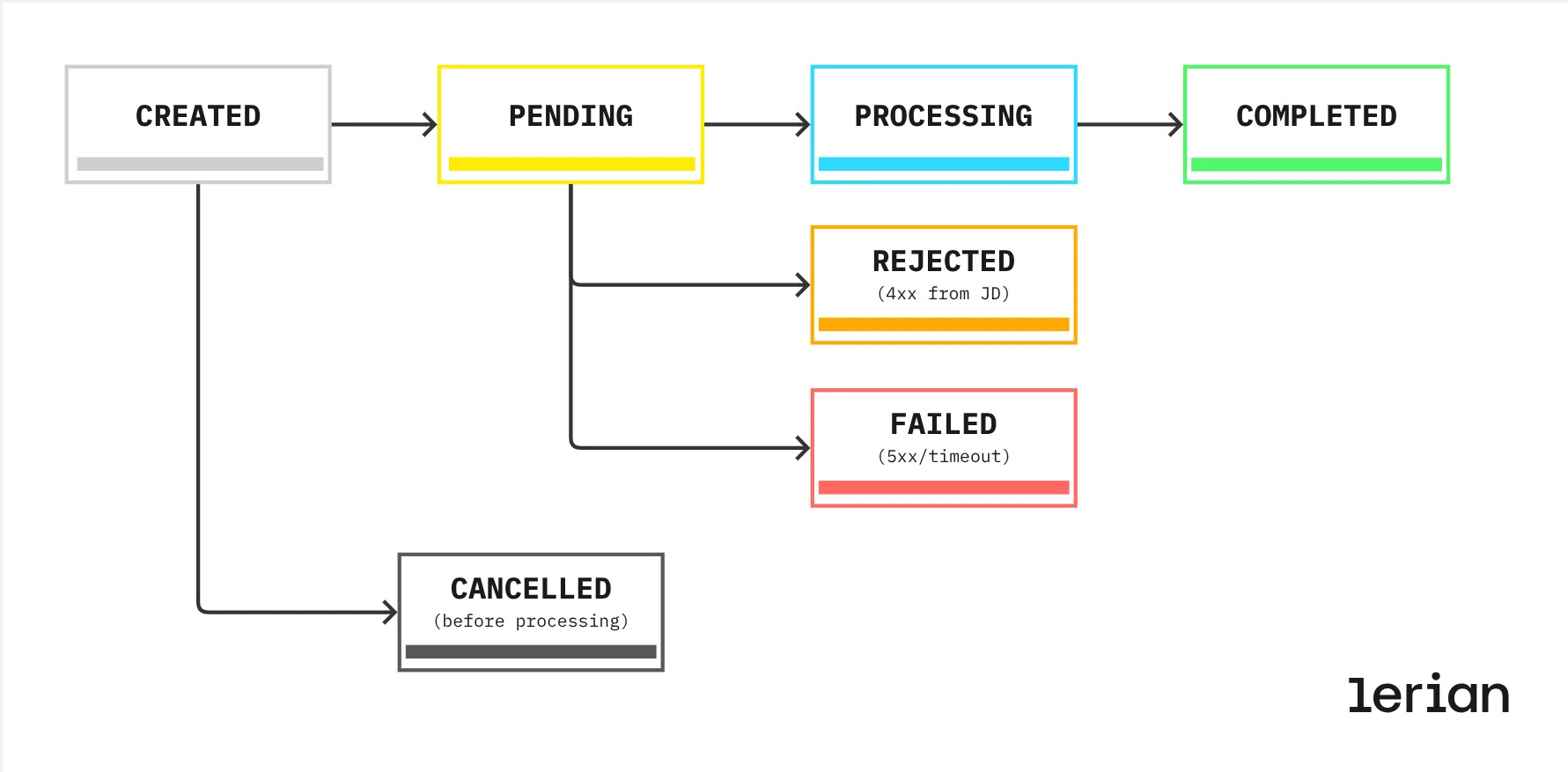
- Customer confirmed (
CREATED) — transfer confirmed by the customer, queued for submission - Submitted to bank network (
PENDING) — message sent to JD Consultores, awaiting acknowledgment - Bank processing (
PROCESSING) — JD accepted the transfer and is routing it - Settled (
COMPLETED) — transfer successfully settled at the destination bank - Rejected (
REJECTED) — JD returned a business error (e.g., invalid account data) - Failed (
FAILED) — technical failure (timeout or service unavailability) - Cancelled (
CANCELLED) — customer cancelled before the transfer was submitted
TED IN
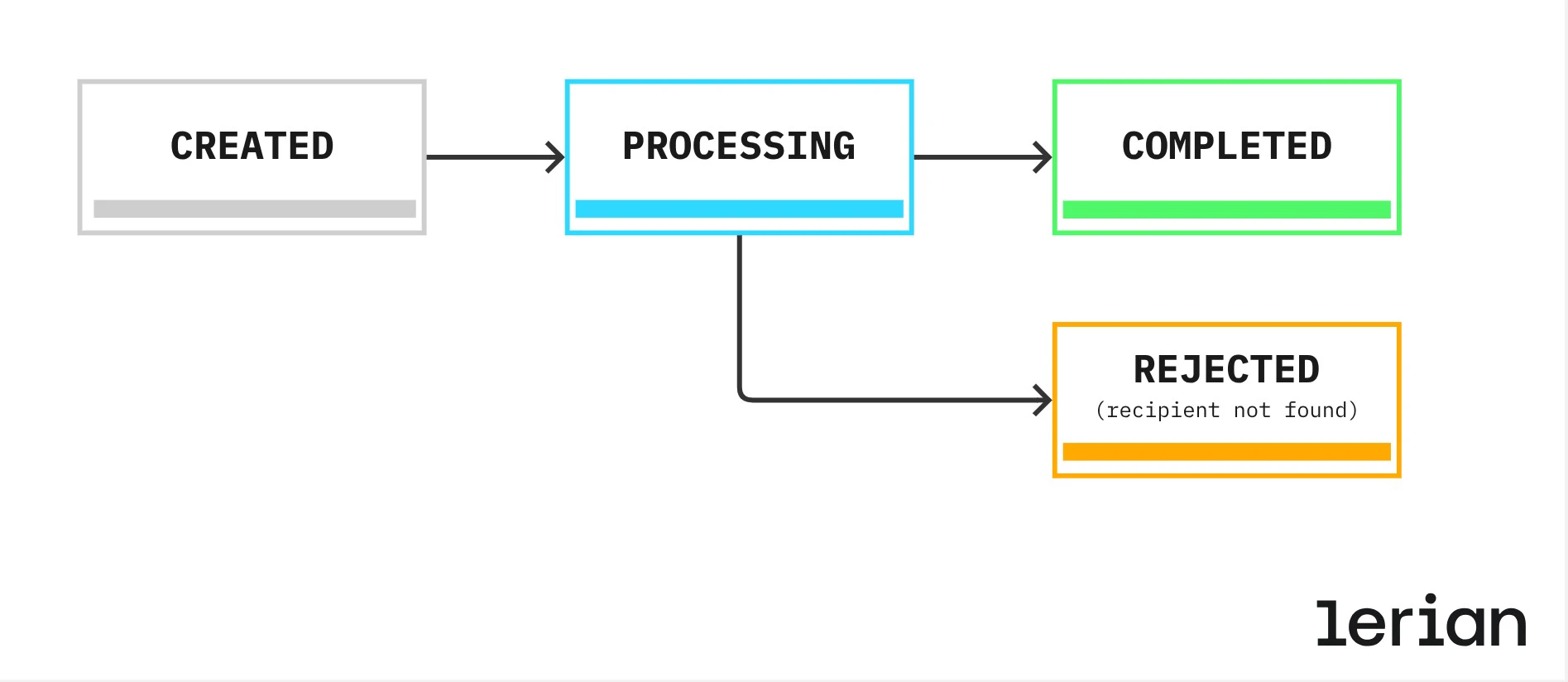
- Transfer detected (
RECEIVED) — incoming message persisted, pending internal processing - Recipient validated (
PROCESSING) — system is crediting the recipient account - Amount credited (
COMPLETED) — recipient account successfully credited
TED IN supports a
COMPLETED → FAILED transition to handle chargebacks — cases where a transfer was initially settled but later reversed by the sending bank.P2P
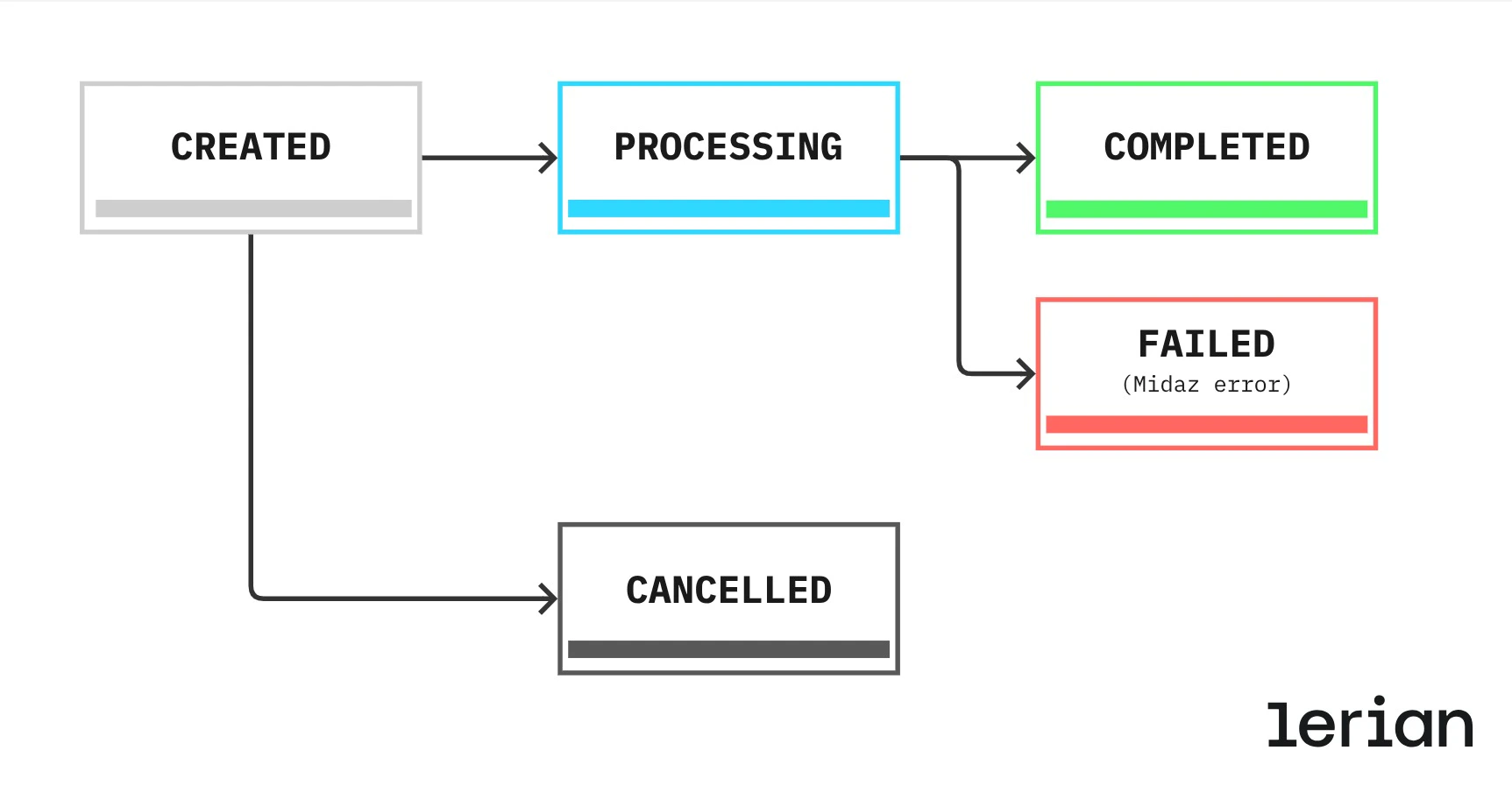
- Confirmed (
CREATED) — transfer initiated between internal accounts - Processing (
PROCESSING) — Midaz transaction in progress - Settled (
COMPLETED) — both accounts updated successfully - Failed (
FAILED) — processing error - Cancelled (
CANCELLED) — cancelled before processing began
Fee review before confirmation (TED OUT only)
For TED OUT, customers go through a two-step flow:
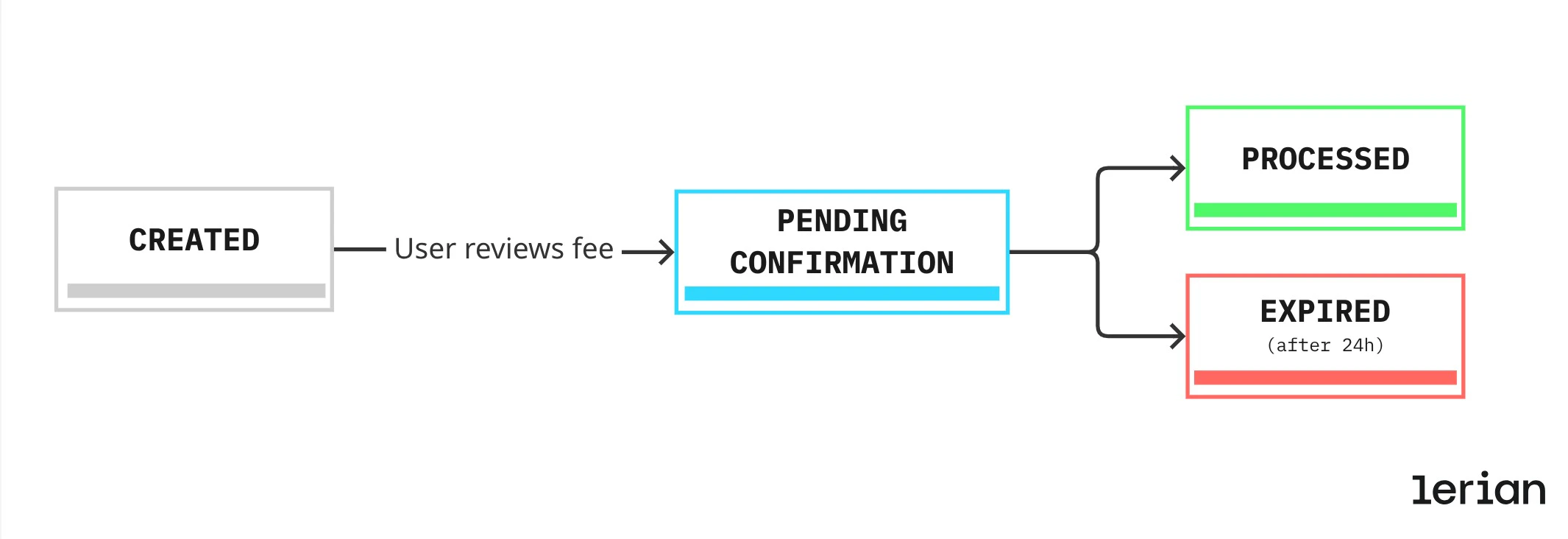
- Pending confirmation — the fee has been calculated and presented; the customer hasn’t confirmed yet
- Processed — the customer confirmed and the transfer was created
- Expired — 24 hours elapsed without confirmation
Status history
Every status transition is recorded with a timestamp, the previous state, the new state, and a reason (for errors and cancellations). This gives you a full audit trail for every transfer — who changed what and when. The
changedBy field records whether the transition was triggered by the system, the customer, or an admin.
Reconciliation fields
Use these fields to match transfer records against your bank statements:
| Field | Use for |
|---|---|
controlNumber | Matching against JD SPB records |
confirmationNumber | Customer-facing reference |
transferId | Internal system lookups |
originalTransferId | Link a TED IN devolution to the original incoming transfer |
devolutionCode | Classify the BACEN reason for a TED IN devolution |
createdAt | Filtering by initiation date |
completedAt | Filtering by settlement date |
Data retention
Querying your data
Use List Transfers to query transfers with the following filters:
- By date range — filter by
createdAtorcompletedAt - By type — TED OUT, TED IN, or P2P
- By status — e.g., only
COMPLETEDtransfers for reconciliation, orFAILEDfor investigation
For developers
Storage Entities are stored in PostgreSQL.
recipientDetails uses JSONB to accommodate the varying structures of different recipient types (TED OUT, TED IN, P2P), while recipientAccountId links to a Midaz account when the recipient is internal. Main indexes cover (tenant_id, created_at) for paginated listing, (tenant_id, status, created_at) for status filters, and (control_number) for JD lookups. The transfer_status_history audit table is indexed by (transfer_id, changed_at DESC) and (tenant_id, changed_at DESC) for efficient time-range audit queries.
Incoming TED deduplication
Before processing a TED IN, the plugin persists the raw JD message to the JDIncomingMessage table. This guarantees no incoming transfer is lost if the service fails mid-processing. Deduplication is enforced via a unique constraint on sequenceNumber (JD’s NumCabSeq), so re-delivered messages are ignored automatically.
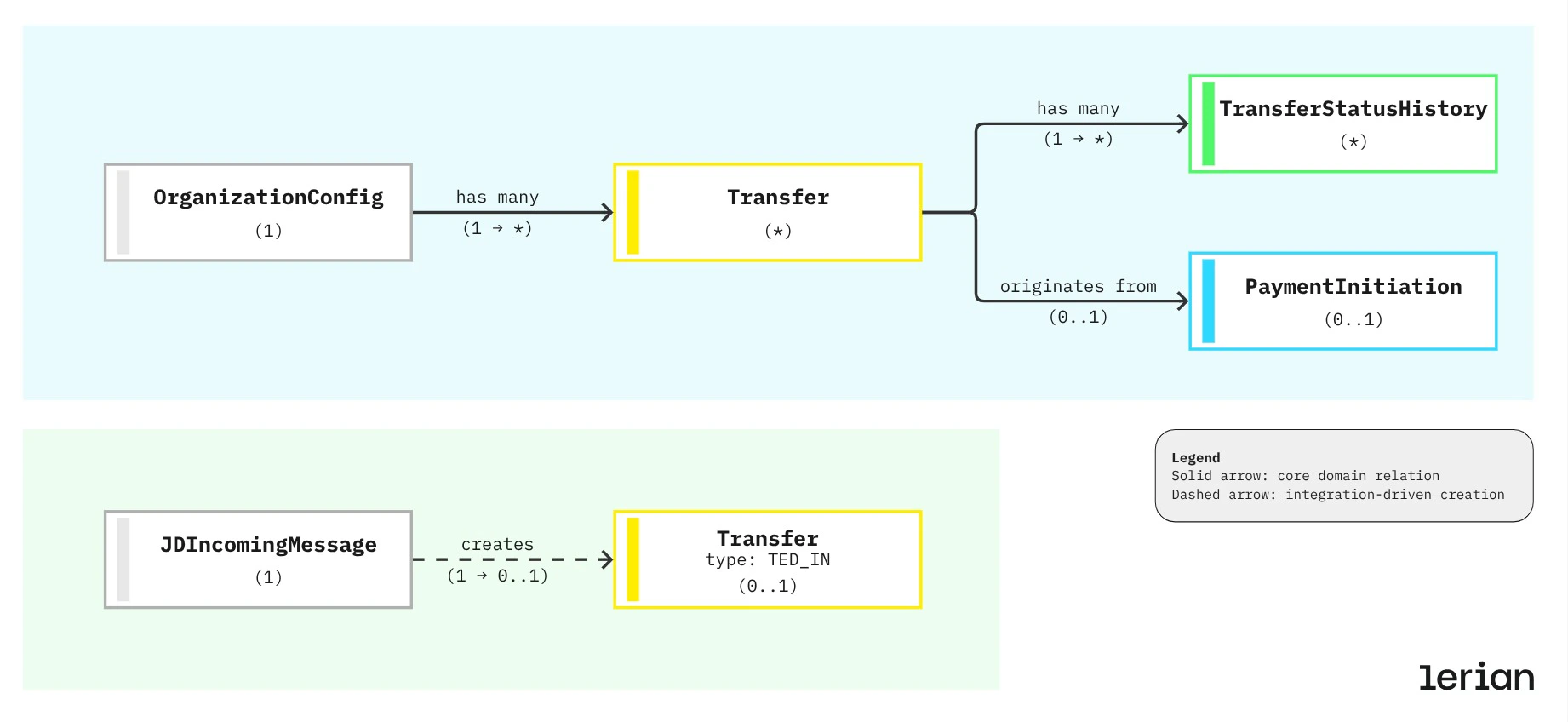
Entity relationships
- Each
Transferbelongs to one organization and has manyTransferStatusHistoryrecords. - TED OUT transfers may originate from a
PaymentInitiation(the two-step flow). - Each
JDIncomingMessagecreates at most oneTransferof typeTED_IN.